

Microsoft’s Copilot is reshaping productivity with its AI-driven capabilities, aligning with the tech giant’s broader AI vision. Currently, a suite of Copilot-branded products enhance Microsoft’s offerings, providing services ranging from email summarization in Outlook to real-time transcription in Teams.
This also encompasses the GitHub Copilot for code generation and a variant that integrates seamlessly into Windows and online platforms, offering comprehensive assistance much like OpenAI’s ChatGPT.
This article dives into the variety of Copilot solutions offered by Microsoft and outlines their functions and individual distinctions.
Understanding Microsoft Copilot
Microsoft Copilot, evolving from Bing Chat, is integrated within the Bing search engine, Windows 10, Windows 11, and Microsoft Edge sidebar. It’s accessible via a dedicated key on newer PCs, standalone mobile apps, and even through a Telegram room.

Leveraging OpenAI’s models, thanks to a tight partnership with OpenAI, Copilot can execute a spectrum of tasks articulated in human language. This includes crafting essays, translating texts, and web summarization—though with some limitations.
Beyond text, Copilot taps into Microsoft’s Image Creator, based on OpenAI’s DALL-E 3, for generating visuals, and integrates with Suno for music creation, showcasing its multifaceted abilities.

Copilot enhances functionality with plugins for external services like Instacart, Kayak, OpenTable, and Shopify, continuously broadening its utility with new additions.
What Can Copilot Manage in Windows?
Within Windows 11, Copilot acts as a digital assistant, accessible via typing or speech, to manage settings and perform tasks such as engaging battery saver, revealing system information, and managing the recycle bin.

Windows 11 users can toggle between “Work” and “Web” modes to harness Copilot’s capabilities tailored for Microsoft 365 or broader internet queries.
Introducing Copilot Pro
At $20 per month, Copilot Pro offers premium features, including priority access to advanced OpenAI models and exclusive Copilot functionalities.
Subscribers benefit from across-the-board generative AI features in Microsoft’s productivity suite, facilitating tasks in Word, Excel, PowerPoint, Outlook, and OneNote.
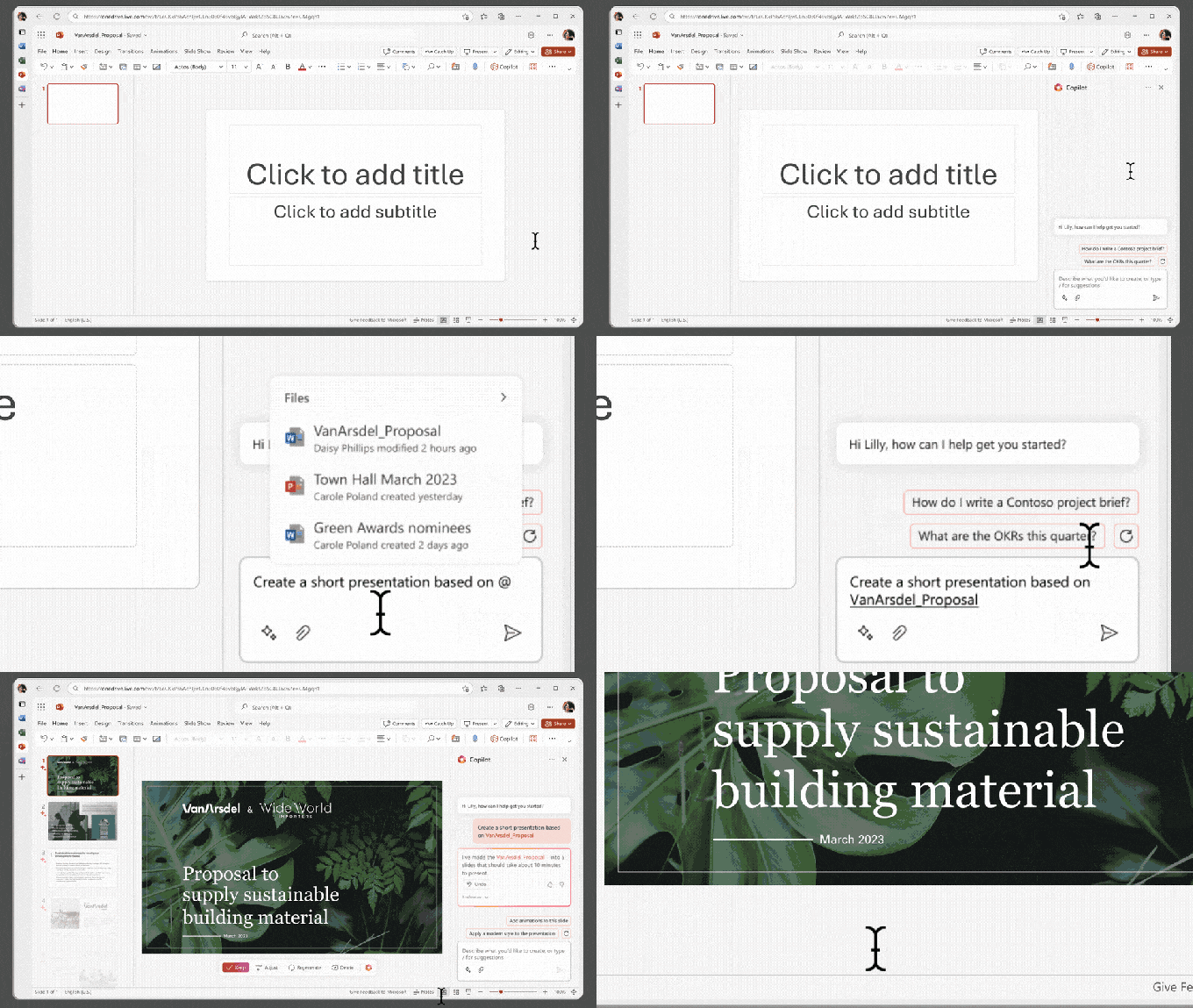
However, the Copilot in Teams feature, offering real-time summaries and task management for meetings, remains exclusive to corporate clients with an appropriate Microsoft 365 subscription.
Exploring Copilot for Microsoft 365
Targeted at businesses, Copilot for Microsoft 365 merges AI enhancements with a focus on professional use, featuring enterprise-grade data handling and sophisticated data mapping for personalized interactions.

Microsoft has also integrated Copilots into specific applications to enhance functionality, from Power Pages and Microsoft Supply Chain Center to Azure and Security solutions, revealing a broad array of specialized capabilities.
Delve into Copilot Studio
Copilot Studio offers a platform for customizing AI assistants tailored to specific business needs, facilitating integration with various data sources and enabling the creation of specialized Bots or “copilots”.

GitHub Copilot: A Closer Look
Distinct from Microsoft’s suite, GitHub Copilot is designed for developers, aiding code generation across a myriad of programming languages and providing a platform for enhancing coding workflows.
Accessible through various IDEs and GitHub Codespaces, GitHub Copilot extends its utility through Copilot Chat, offering comprehensive support to programmers at different subscription tiers.
Challenges Facing Copilot
While Microsoft’s Copilots showcase promising AI advancements, they face hurdles, including inaccuracies, security concerns, and ongoing debates around data use and copyright law, highlighting the complexities of deploying generative AI in practical applications.
Compiled by Techarena.au.
Fanpage: TechArena.au
Watch more about AI – Artificial Intelligence

