

Copilot represents Microsoft’s approach to enhancing productivity through generative AI, and it is continuously evolving alongside the company’s AI strategies. Currently, there are approximately twelve products under the Copilot brand that facilitate various features across Microsoft’s software and services, including summarization features in Microsoft Outlook and transcription services in Microsoft Teams.
Additionally, there is GitHub’s Copilot tool—owned by Microsoft—which generates code, as well as the Copilot available on Windows and the web, functioning as a versatile assistant.
This article delves into the various Microsoft Copilots, detailing their functionalities and highlighting the distinctions between the premium and free versions.
What is Microsoft Copilot?
Previously referred to as Bing Chat, Microsoft Copilot is integrated into the Bing search engine as well as Windows 10, Windows 11, and the Microsoft Edge sidebar. Certain newer computers even feature a dedicated key to initiate Copilot. Furthermore, standalone Copilot applications are available for both Android and iOS, along with an in-app Telegram group.

Leveraging tailored versions of OpenAI’s models (with which Microsoft has a strong collaborative relationship), Copilot can execute a myriad of tasks articulated in natural language, such as composing poems and essays, translating text into other languages, and summarizing web content (although not without some imperfections).
Similar to OpenAI’s ChatGPT and Google’s Gemini, Copilot has the ability to browse the web (through Bing in this case) for real-time information. While it occasionally makes errors, this access to search results offers Copilot an edge over offline bots like Anthropic’s Claude when addressing timely inquiries.
Additionally, Copilot can generate images with the help of Image Creator, an AI art generator based on OpenAI’s DALL-E 3 model. It can also create music by integrating with Suno, a platform designed for generating AI music. For instance, entering commands such as “Create an image of a zebra” or “Generate a song with a jazz rhythm” in Copilot will prompt the relevant tool.

Copilot also enables the use of plug-ins for external applications and websites. Among these are plug-ins for Instacart (related to meal planning and culinary inquiries), Kayak (for travel arrangements), OpenTable (for dining reservations), and Shopify, among others. New options are frequently being added.
Furthermore, Copilot facilitates Copilot Pages, an interactive digital workspace that allows users to edit and share content generated by Copilot. Subscribers gain access to BizChat, a business-oriented center that integrates with Pages to source data from the web and work files, aiding in the creation of project plans, meeting notes, proposals, and more.
Which Windows Settings Can Copilot Manage?
On Windows 11 (not necessarily applicable to Windows 10), Copilot can manage specific settings and functions, acting akin to a digital aide.
With Copilot, users can either type or utilize Windows 11’s voice recognition feature to perform various actions, such as toggling the battery saver, displaying device and system information, initiating live captions, revealing the computer’s IP address, and emptying the recycle bin.

Within Windows 11, users can toggle between “Work” and “Web” modes using the Copilot interface, where ‘Work’ mode includes Copilot’s Microsoft 365 functionalities within Windows.
What is Copilot Pro?
Copilot Pro is the premium offering from Microsoft, priced at $20 per month.
Subscribers of Copilot Pro benefit from prioritized access to the most advanced OpenAI models (for instance, o1) during peak usage periods. Exclusive features of Copilot, such as higher-resolution images from the Image Creator, can only be accessed with a Pro subscription.
Copilot Pro users also gain access to generative AI functionalities across the Microsoft 365 suite, which includes Word, Excel, PowerPoint, Outlook, and OneNote.
Within Word and OneNote, Copilot can write, edit, summarize, and generate content. In Excel and PowerPoint, it can transform natural language prompts into presentations and visual representations—optionally grounded in data from files and templates. Outlook users can utilize Copilot to draft email replies, offering options to adjust the length or tone of messages.
Enhanced features are anticipated as part of Microsoft’s upcoming Copilot Wave 2 update.
In forthcoming updates, Copilot in PowerPoint will be able to incorporate company-approved images from SharePoint libraries, and Outlook will introduce a “Prioritize my inbox” feature that summarizes each email for insights, including identifying the most responsive contacts. By late 2024, Outlook users will also have the capability to teach Copilot about topics, keywords, and significant individuals, marking related emails as high-priority.
In Excel, Copilot can structure data, generate graphs, create pivot tables, and navigate users through new formulas and macro creation. It also utilizes Python for advanced data analysis, translating user-described tasks like forecasting and visualization into the necessary Python code.
A future version of Copilot in Word will allow users to seamlessly access information from outside Word, PowerPoint, and PDF documents, including emails and encrypted files, alongside meeting details. In OneDrive, Copilot will summarize, present metrics, and compare files on behalf of users.
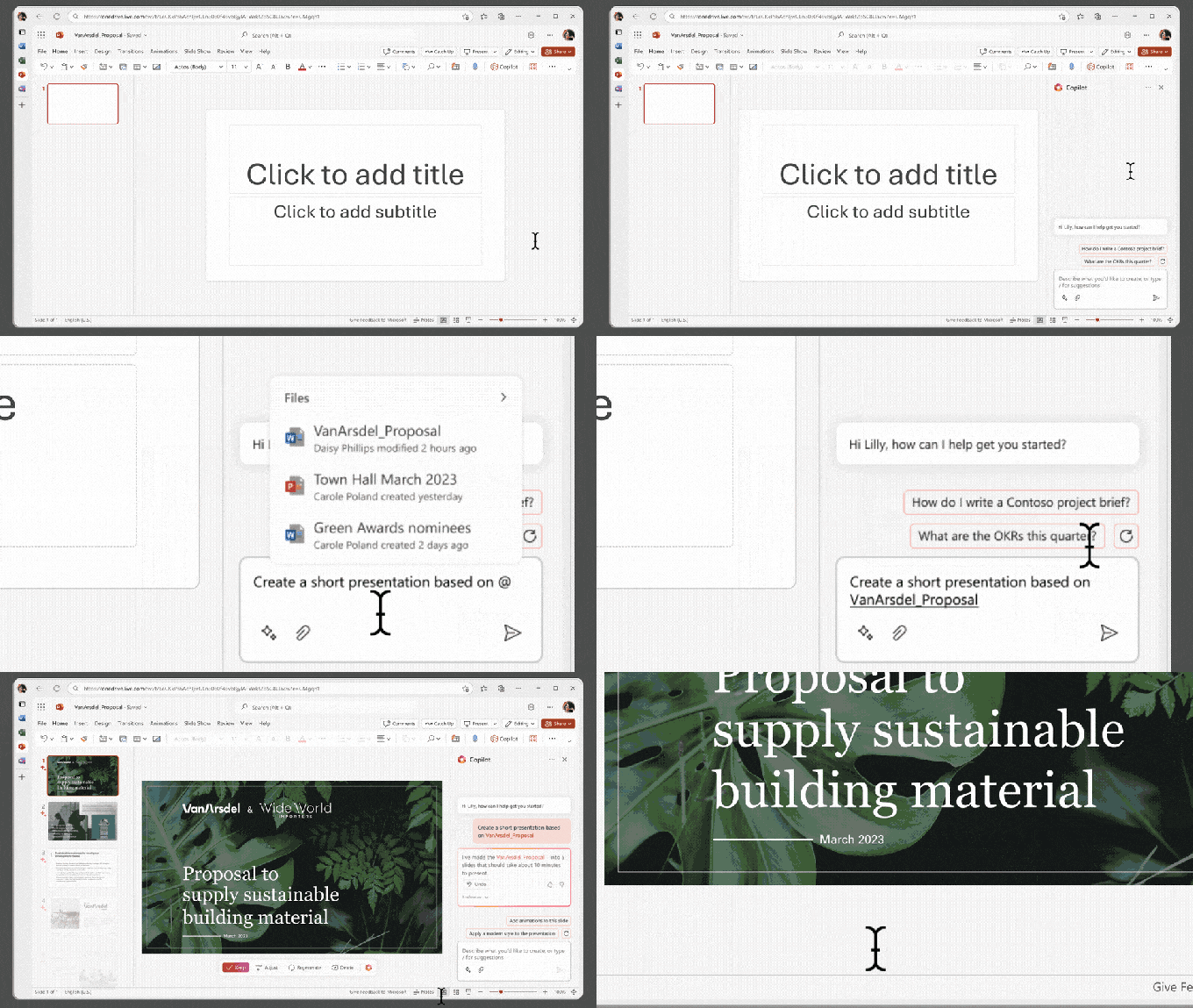
In addition to the upgrades in Microsoft 365, Copilot Pro users will receive landscape formatting options and 100 daily “boosts” in Image Creator compared to only 15 for free users, facilitating a faster image-generation process.
It is crucial to note that Copilot Pro does not include Copilot in Teams, which offers real-time summaries and action points during tasks including identifying individuals for follow-ups. Copilot for Teams is reserved for enterprise Copilot customers, requiring an enterprise-level Microsoft 365 license or equivalent.
What is Microsoft 365 Copilot?
Distinct from the consumer version, Microsoft 365 Copilot comprises a suite of generative AI add-ons specifically designed for business applications within Microsoft 365.
Priced at $30 per user per month, Microsoft 365 Copilot is offered to customers holding a Microsoft 365 E3, E5, Business Standard, or Business Premium license. While delivering many of the same features found in Copilot Pro across Microsoft 365 applications, it also incorporates “enterprise-grade data protection” and the Semantic Index, which maps organizational data and content to facilitate more tailored Copilot responses.

Recently, Microsoft introduced Microsoft 365 Chat, a tool designed to extract information from various Microsoft 365 applications (e.g., Word documents, PowerPoint slides) to provide answers.
Moreover, there are numerous additional Copilots available. Here’s a selection along with their specific functionalities:
- Copilot in Power Pages can produce text, forms, chatbots, and layouts for web pages, capable of creating and modifying image and site design themes.
- Copilot for Sales assists in drafting email replies or executing sales-related actions such as summarizing Teams meetings via Outlook.
- Copilot in Microsoft Supply Chain Center can proactively identify issues—such as weather, financial data, and geographical factors—that may impact supply chain operations.
- Copilot for Service can generate responses to customer inquiries through chat or email, offering an integrated chat environment for customer service representatives with knowledge base access and case history.
- Copilot for Azure suggests configurations for Microsoft Azure-hosted applications and environments, assisting with troubleshooting by pinpointing possible issues and solutions.
- Copilot for Security aims to distill and interpret various forms of cyberthreat intelligence.
- Copilot in Fabric assists in data exploration, preparation, and visualization tasks.
- Copilot in Intune facilitates security policy management and troubleshooting device complications.
- Team Copilot can oversee meeting agendas in Teams while integrating with Loop and Planner to create and assign tasks, monitor deadlines, and notify team members as necessary.
It’s important to note that certain Microsoft Copilots, such as Copilot in Business Central, are included with base software licenses without additional charges. Conversely, Copilot for Sales and Copilot for Service incur extra charges of $20 per user per month or $50 per user per month without an active Microsoft 365 Copilot subscription.
Copilot Studio
Copilot Studio provides a dashboard for clients to permit Microsoft 365 Copilot access to data in their own or third-party customer relationship management software, enterprise resource management systems, and other databases via pre-built or custom connectors. It enables clients to establish guidelines for Copilots and design custom-tailored “copilots.”
Subscribers of Microsoft 365 Copilot can leverage Copilot Studio to create personalized copilots through natural language descriptions. Copilots can filter specific datasets for particular teams or users or integrate with automation, third-party plugins, or services to initiate workflows.

Additionally, Copilot Studio serves as a platform for customers to design what Microsoft refers to as Copilot agents. These AI agents, which can be “@ mentioned” in Outlook and Teams, utilize context and memory to navigate various business processes, adapt based on user feedback, and seek assistance in unfamiliar situations.
Copilot agents vary in complexity, ranging from straightforward prompt-response types to advanced bots capable of monitoring email inboxes and automating data entry tasks. Microsoft offers several pre-designed options, including the Visual creator agent that generates images, designs, and will soon generate videos.
What is GitHub Copilot?
Distinct from the numerous other Copilots offered by Microsoft, GitHub Copilot focuses on generating code and supporting software development tasks. It can be installed as an extension for various integrated development environments (IDEs), including Visual Studio Code, Visual Studio, Neovim, and JetBrains, or accessed in the cloud through GitHub Codespaces.
Powered by generative AI, GitHub Copilot has been trained on a vast number of coding examples across languages like Python, JavaScript, TypeScript, Ruby, and Go—much of which is available publicly on GitHub. As developers write code, GitHub Copilot offers suggestions in real-time, allowing for selection or rejection of various proposals.
GitHub Copilot is also capable of translating code into natural language descriptions, and it supports extensions that enable the addition of third-party features. In February, GitHub introduced several updates including Vision for Copilot, which allows users to attach screenshots or images to a chat, prompting Copilot to construct the corresponding interface, code, and alt text.
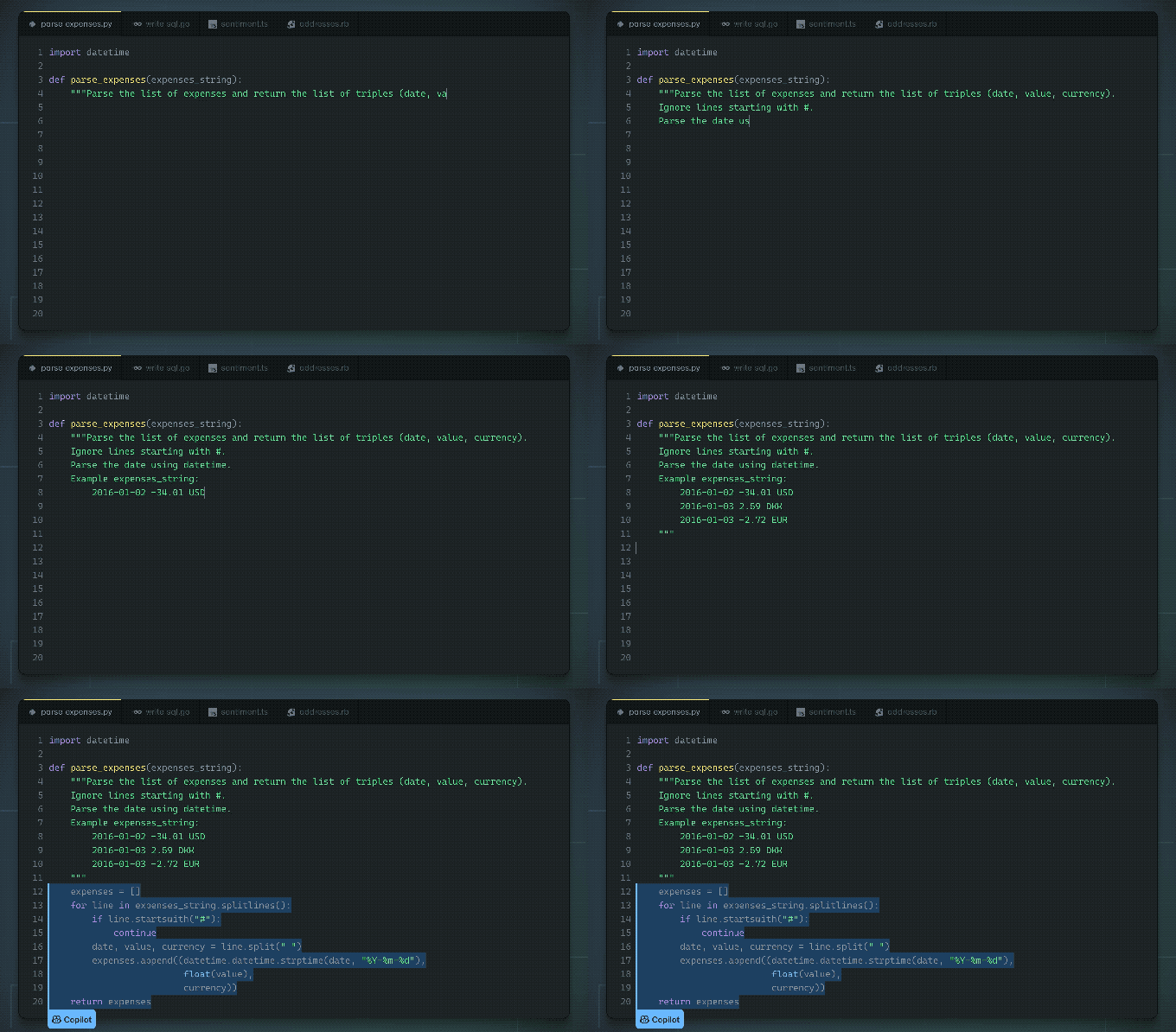
GitHub Copilot is available for free to students and verified open-source contributors and educators. For individuals, it costs $10 per month, while business customers pay $19 per month per user, and enterprises incur a fee of $39 per user per month.
Individual, business, and enterprise subscribers have access to Copilot Chat, which provides a contextual conversational interface aware of the overall code being developed, enabling it to answer related inquiries. Beyond this, Chat assists developers in rectifying bugs and security vulnerabilities through code analysis.

The business and enterprise plans for GitHub Copilot come with features such as license management, intellectual property protection, organization-wide policy enforcement, and enhanced privacy settings. Enterprise clients can customize offerings for their codebases, refine the underlying models, and access Copilot through Microsoft Copilot online and GitHub.com.
In April, GitHub introduced Copilot Workspace as a new avenue for AI-enhanced software engineering, offering a development environment that harnesses AI-powered agents to aid in brainstorming, planning, building, testing, and executing code using natural language.
Challenges Faced by Copilot
Given the intricate and often contentious landscape of modern generative AI technology, Microsoft’s Copilots encounter a range of challenges.
The models occasionally make errors in their summaries and responses, attributed to their propensity for “hallucination,” including inaccuracies while summarizing meetings. The Wall Street Journal reported an incident where, during a meeting, Copilot mistakenly fabricated participant names and suggested discussions that were never held.
As for GitHub Copilot, GitHub acknowledges that it might generate insecure coding patterns, bugs, and outdated API references, or exhibit coding styles reflecting the imperfect nature of its training dataset. The code suggested may not always compile, run correctly, or even be logical.
Security and privacy remain serious concerns for Copilot users. Among the biggest issues is the ongoing debate regarding fair use.
Similar to many generative AI systems, the models powering Microsoft’s Copilots have been trained on publicly available data, some of which may be copyrighted or subject to restrictive licensing. While Microsoft—and others—contend that the fair use doctrine protects it from copyright claims, this has not prevented data owners from filing class-action lawsuits against Microsoft, GitHub, OpenAI, and others, citing clear violations of licensing and intellectual property rights.
To address potential courtroom challenges relating to fair use, Microsoft has implemented policies to shield certain customers—though this does not resolve the ethical dilemma of using data without permission, which could deter some clients from collaboration.
This article originally published in August 2024 and will be periodically updated with new insights.
Compiled by Techarena.au.
Fanpage: TechArena.au
Watch more about AI – Artificial Intelligence

